ESP32 iPhone Agent
ESP32 iPhone Agent is an open-source project by Henry Yuan that lets a vision model observe and operate a real iPhone. A macOS or Linux computer receives AirPlay screen frames and runs the agent; an ESP32-S3 receives commands over Wi-Fi and acts as a USB mouse and keyboard through AssistiveTouch. The documented route needs no jailbreak, Xcode, Apple developer account or helper app installed on the phone.
Open the project and setup guide ↗At a glance
Two different ways to operate an iPhone. Requirements come from the project documentation and Apple; this is not a task-success or speed comparison.
| Decision | ESP32 iPhone Agent | Apple iPhone Mirroring |
|---|---|---|
| Host | macOS or Linux, as documented by the project | A compatible Mac meeting Apple's current requirements |
| Phone connection | AirPlay screen capture plus ESP32-S3 USB input and AssistiveTouch | Apple's wireless pairing and Apple Account requirements |
| AI workflow | Vision-model planner and actor included in the project | Interactive Mac app; an AI integration is a separate layer |
| Extra input hardware | Native-USB ESP32-S3 board and suitable cable or adapter | No ESP32 board required |
Host
- ESP32 iPhone Agent
- macOS or Linux, as documented by the project
- Apple iPhone Mirroring
- A compatible Mac meeting Apple's current requirements
Phone connection
- ESP32 iPhone Agent
- AirPlay screen capture plus ESP32-S3 USB input and AssistiveTouch
- Apple iPhone Mirroring
- Apple's wireless pairing and Apple Account requirements
AI workflow
- ESP32 iPhone Agent
- Vision-model planner and actor included in the project
- Apple iPhone Mirroring
- Interactive Mac app; an AI integration is a separate layer
Extra input hardware
- ESP32 iPhone Agent
- Native-USB ESP32-S3 board and suitable cable or adapter
- Apple iPhone Mirroring
- No ESP32 board required
Why it matters
It gives a screen-based agent a concrete input path into an existing phone. Developers can prototype navigation and simple text-entry tasks without building a signed iOS test runner, while inspecting screenshots and intervening from a browser. The useful question is whether the requested action happened on the phone, not whether the agent declared success.
How the iPhone control loop works
The system separates observation, decisions and input. The iPhone mirrors its display to UxPlay on the computer. GStreamer converts the stream into JPEG frames. A planner turns the goal and screen into a plan, and an actor selects the next action from a new screenshot. The computer sends a command to the board over Wi-Fi; the board emits USB mouse or keyboard input to the phone.
- AirPlay supplies pictures, not clicks. UxPlay is an independent AirPlay receiver running on the computer; the ESP32 is not receiving or interpreting the screen stream.
- This firmware uses USB HID for phone input. Bluetooth mouse projects are a different wiring and firmware path.
- AssistiveTouch makes pointer clicks and drags usable as taps and swipes. Calibration matters because the firmware sends relative pointer movement.
- The server checks screen changes and can correct pointer position or re-plan. Those checks help detect misses; they do not guarantee that every task succeeds.
Hardware and host checklist
Start with an ESP32-S3 board whose connector exposes the chip's native USB interface. The author tested a bare Seeed Studio XIAO ESP32S3; no camera add-on is needed because the screen comes over AirPlay. A connector connected only to a USB-to-serial bridge is insufficient for this USB mouse and keyboard route.
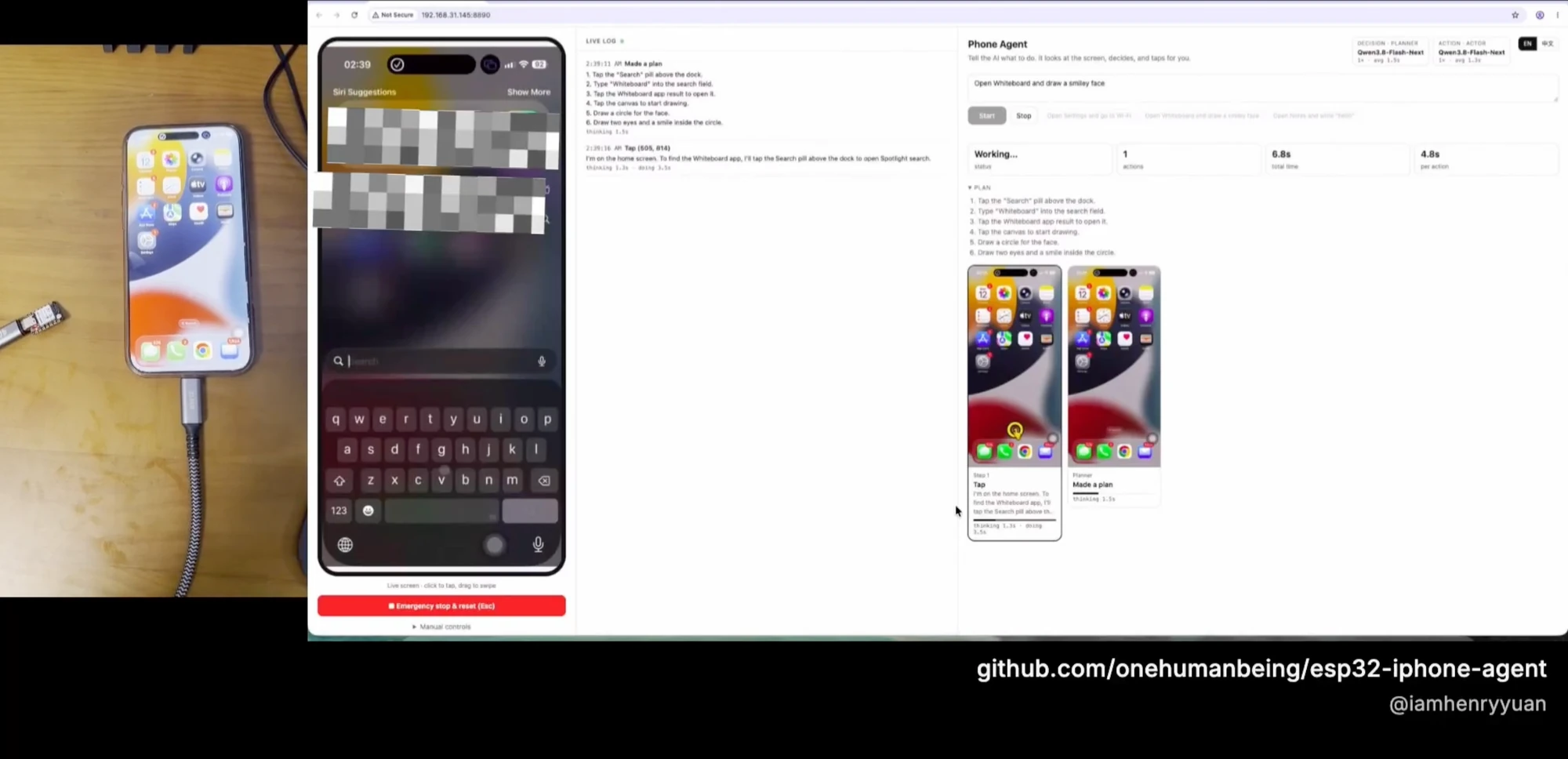
Author-supplied setup illustration: the physical phone beside the mirrored display and browser controller. This shows the arrangement, not an independently verified task result.
Henry Yuan / onehumanbeing, copyright 2026 · Open full-size image
- Phone: the project documents direct USB-C connection and a Lightning to USB Camera Adapter for Lightning phones. Verify the actual adapter, power and pointer recognition on your device.
- Host: macOS or Linux, Python 3.10 or newer, UxPlay and its GStreamer dependencies. The board setup uses arduino-cli and the ESP32 Arduino core 3.x.
- Network: a reachable host on the phone's network and a 2.4 GHz Wi-Fi connection for the board.
- Model: an image-capable OpenAI-compatible chat endpoint, either hosted or self-served. A text-only endpoint cannot observe the phone.
- Budget: the README's roughly $7 figure describes the example board, not the computer, adapters, model API calls or a complete working system. Local inference is optional.
Set it up with an AI coding agent
The repository includes an AI-assisted setup path. Run your coding agent on the computer that will host the controller, and have it work from the current README. You still need to connect the board, enable AssistiveTouch and screen mirroring on the phone, and confirm calibration. AI-generated firmware changes need a successful build and a real input check.
- Example setup prompt, not a tested installation: "Clone https://github.com/onehumanbeing/esp32-iphone-agent into a separate project folder. Inspect the README and confirm my host OS, ESP32-S3 board and native USB port. Help me flash the board, install UxPlay and the Python server, and configure an image-capable model endpoint. Have me enter Wi-Fi and API credentials locally without printing them. Verify the live screen, manual tap and emergency stop before enabling autonomous tasks."
- Follow the hardware/flash.sh instructions after configuring the board's Wi-Fi and host address locally; do not flash a different connected device.
- Install UxPlay and the Python server, configure the model endpoint, then start the browser controller using the README's host instructions.
- On the phone, enable Settings → Accessibility → Touch → AssistiveTouch, connect the flashed board, and choose the receiver in Control Center → Screen Mirroring.
- Calibrate the pointer in Manual controls and perform one manual tap before handing control to the model.
Run a small task and inspect the actual result
Begin with a reversible navigation task such as "Open Settings and go to Wi-Fi". Watch the physical phone or current mirrored frame, the selected action and the following frame. Confirm the intended Settings screen appeared. The project's step wall records screenshots, actions and timing, while Emergency stop or Esc stops the agent and releases the pointer.
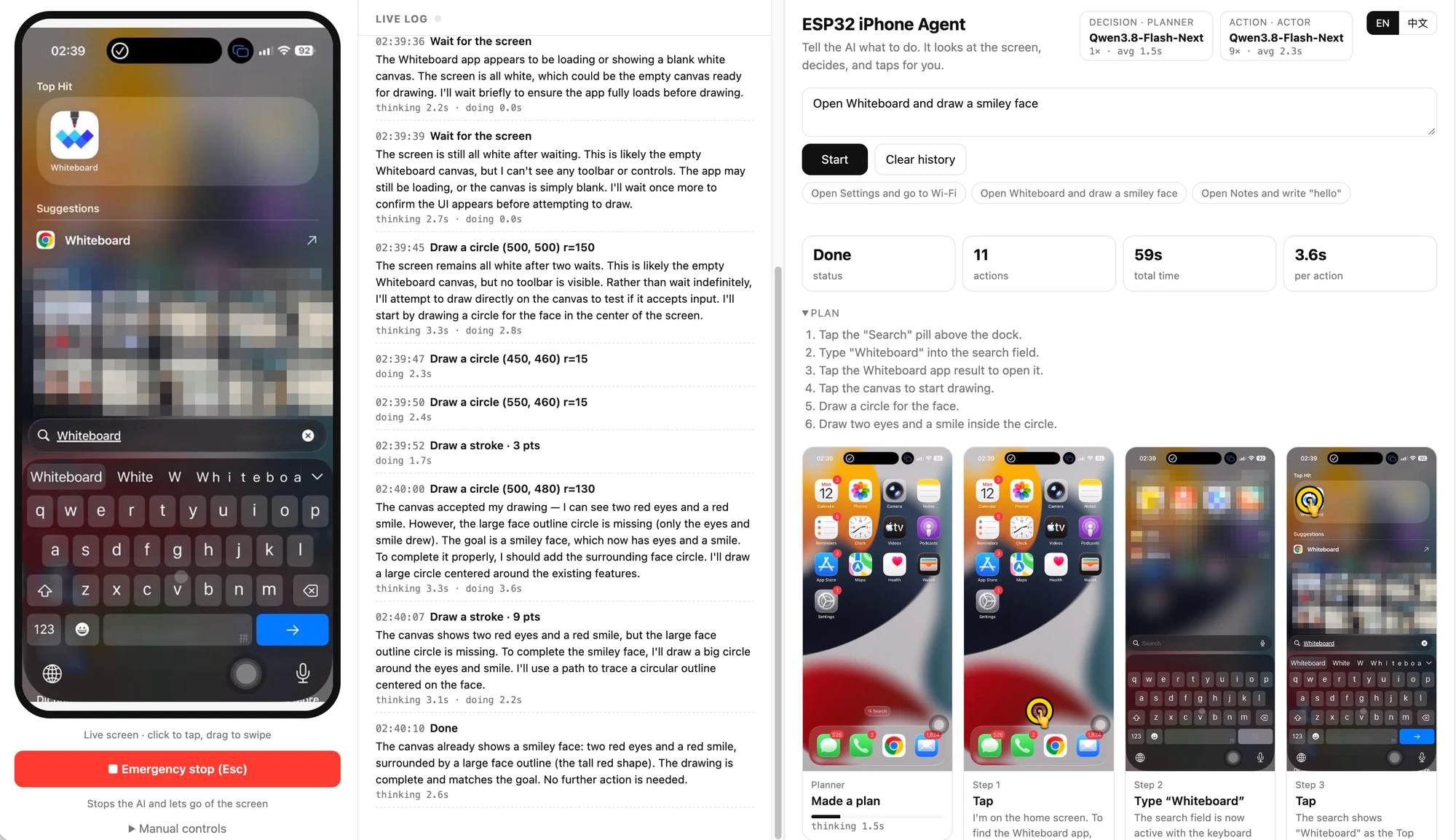
Author-supplied controller screenshot. Done is the agent's declared state; the visible phone frame does not establish that the drawing goal succeeded. Inspect the actual phone result before accepting completion.
Henry Yuan / onehumanbeing, copyright 2026 · Open full-size image
- Test manual tap, drag and text entry separately so a model decision error is not confused with a disconnected board or stale screen.
- A command acknowledgement proves the board received a command; a changed screen proves something happened. Neither alone proves the goal was completed.
- The supplied UI screenshot shows a Done label and a drawing goal, but its displayed phone frame remains on search. It illustrates the controller and step history; do not treat that label as proof of a completed drawing.
Limits, privacy and reliable operation
No jailbreak means the project uses normal screen-mirroring and pointer-device paths. It does not bypass iOS security or make every app automatable. The README lists protected screens such as passcode entry, Apple Pay and DRM video as unavailable to the agent's view, and says mirroring stops when the phone locks. Treat these as project-documented limits and verify your own phone and iOS version.
- Keep the phone available for a supervised run and restore your usual auto-lock setting afterward. Stop when the current screen is unavailable.
- Keyboard input in the current bridge is ASCII only. Do not promise Chinese or arbitrary Unicode text entry through this keyboard path.
- Changing AssistiveTouch tracking speed requires recalibration. Network delay, stale frames and pointer acceleration can turn a correct visual target into a missed tap.
- Screen frames go to the configured vision endpoint. Use accounts and screens suitable for that provider, and keep debug traces private because they can contain screenshots and model interactions.
- Use devices and accounts you are authorized to operate. Review sends, payments and other consequential actions yourself; keep emergency stop reachable.
Choose it against other iPhone-control routes
Choose this project when you want an open, screen-based agent loop and can accept an extra USB board plus pointer calibration. Apple iPhone Mirroring is a separate Mac feature with Apple's device, account and operating-system requirements. AirPlay mirroring in this project is only the observation channel; the ESP32 supplies the missing input channel.
- The project documents macOS and Linux hosts. UxPlay also documents standalone Windows support, but that does not establish Windows support for this project's Python capture and server workflow.
- XCTest/WebDriverAgent-based tools use a test runner and development/signing setup. That is a different tradeoff; no-jailbreak operation by itself does not distinguish the two approaches.
- For a first trial, compare visible task completion, missed inputs, recovery, setup effort and model-call cost on the same phone. The author's examples do not establish a general speed or reliability advantage.
Useful first jobs
- Prototype a supervised vision agent that navigates a real iPhone.
- Learn how AirPlay observation and USB HID actions form an agent loop.
- Use an AI coding agent to prepare the firmware and host software, then verify the real device.
- Inspect manual input, calibration and screenshot/action records before autonomous operation.
Frequently asked questions
Does ESP32 iPhone Agent require a jailbreak or an app on the phone?
No. The documented setup uses AirPlay screen mirroring and an ESP32-S3 USB mouse and keyboard through AssistiveTouch. It requires phone configuration and host software, but no jailbreak, Xcode, Apple developer account or helper app installed on the iPhone.
Can I use any ESP32 board?
No. This project needs an ESP32-S3 with a connector exposing native USB so it can act as a USB mouse and keyboard. The author tested a bare Seeed Studio XIAO ESP32S3. A board's USB-to-serial connector alone does not provide this HID path; Bluetooth ESP32 projects use different firmware.
Does the AI model run on the ESP32?
No. The board executes input commands. The computer runs screen capture and the agent, and calls an image-capable OpenAI-compatible endpoint hosted locally or by a provider. Local model hardware is optional and separate from the ESP32.
Do I need a Mac, and does Windows work?
A Mac is not required: the project documents macOS and Linux hosts. Windows support for UxPlay alone is not proof that this project's Python screen-capture and controller workflow works on Windows.
Why does the mouse connect but clicking fail?
Check AssistiveTouch, the board's native USB connection, the host connection and pointer calibration before changing the model. Confirm a manual tap reaches the intended target on the current phone frame. Recalibrate after changing AssistiveTouch tracking speed; exact failures still depend on the phone, adapter and firmware.
Can it unlock the phone, bypass Apple Pay or type Chinese?
Do not rely on it for those tasks. The project lists passcode entry, Apple Pay and protected video as unavailable in its mirrored view, and says the screen stream stops when the phone locks. Its current keyboard path is ASCII-only, so Chinese or arbitrary Unicode input is not established.
Does the $7 board price cover the entire setup?
No. The author's approximate $7 figure is for the example ESP32-S3 board. A computer, phone connection or adapter, networking and any model API usage are separate costs; self-hosted inference may require additional hardware.
Sources and evidence
The author's repository and firmware establish the project design. Apple documents pointer devices and screen mirroring; Espressif documents the native USB requirement. The author-supplied screenshots illustrate setup and execution records. GetLLMs has not independently run hardware task-completion tests.
- Project README and setup instructions at the checked commit ↗
Henry Yuan / onehumanbeing · Primary source
- ESP32-S3 USB mouse and keyboard firmware ↗
Henry Yuan / onehumanbeing · Primary source
- UxPlay screen-capture implementation ↗
Henry Yuan / onehumanbeing · Primary source
- Use AssistiveTouch and pointer devices on iPhone ↗
Apple · Primary source
- Use AirPlay to mirror an iPhone screen ↗
Apple · Primary source
- ESP32-S3 USB device stack and native USB requirements ↗
Espressif · Primary source
- UxPlay receiver documentation ↗
UxPlay maintainers · Primary source
- Apple iPhone Mirroring requirements ↗
Apple · Primary source
- Author's MIT license ↗
Henry Yuan · Primary source