ChatGPT Images 2.5
ChatGPT Images 2.5 is OpenAI's September 2026 image-generation and editing release. It is rolling out across ChatGPT, ChatGPT Work, and Codex on desktop, mobile, and web, while developers can select the separate `gpt-image-2.5-flare` and `gpt-image-2.5-sunburst` API models.
The release combines consumer features, model-quality claims, two different API choices, exact snapshot IDs, token pricing, and provenance controls. Separating those contracts prevents a ChatGPT feature name from being mistaken for an API model ID or a vendor demo from being treated as an independent quality guarantee.
OpenAI's launch, release notes, model pages, pricing table, image guide, and system card confirm the release date, rollout, features, API model IDs, modalities, endpoints, token rates, quality settings, safeguards, C2PA metadata, and SynthID watermarking. Reddit and Hacker News are used only for current reader questions and mixed early experience; they do not override OpenAI's product facts.
- Create and refine images through ChatGPT with references, Sketch, Templates, and comments.
- Use Flare for high-volume or latency-sensitive API generation and editing.
- Use Sunburst for premium creative and product-imagery workflows where edit precision matters most.
- Evaluate reference fidelity, text rendering, transparent backgrounds, and multi-turn consistency on matched assets.
- Choose and pin an exact API model ID while tracking token cost and provenance requirements.
In ChatGPT, Images 2.5 adds sharper-detail and more precise-editing claims plus Sketch, Templates, image comments, and prompt sharing. In the API, developers choose Flare or Sunburst directly through the Images API or as the model behind the Responses API image-generation tool. `ChatGPT Images 2.5` is not itself the API request ID.
- Flare: `gpt-image-2.5-flare` or dated snapshot `gpt-image-2.5-flare-2026-09-08`.
- Sunburst: `gpt-image-2.5-sunburst` or dated snapshot `gpt-image-2.5-sunburst-2026-09-08`.
- Both accept text and image input, produce image output, and support generation and edit endpoints.
OpenAI positions Flare as the default for most applications and its fastest high-quality everyday image model. Sunburst is the more capable choice for detailed generation and edits where precision matters most, with longer generation times. Both support low, medium, high, xhigh, max, and auto quality settings. Treat this as provider positioning until a matched independent workflow shows which model is better for your exact task.
OpenAI says Images 2.5 better preserves subjects from reference photos, makes more targeted edits, maintains consistency across multiple turns, handles complex layouts and transparent backgrounds, and reduces latency by up to 50% versus Images 2.0. Early community discussion is mixed and focuses on rollout visibility, editing drift, text, artifacts, and whether an account is actually using the new model. Use the same source assets, prompts, settings, and acceptance criteria for your own comparison.
OpenAI currently lists both 2.5 API models at $5 per million text-input tokens, $1.25 per million cached text-input tokens, $8 per million image-input tokens, $2 per million cached image-input tokens, and $30 per million image-output tokens. The model pages say those token rates match GPT Image 2, while the general pricing table separately lists lower GPT Image 2 rows. Because those first-party surfaces conflict, do not claim a reliable percentage price change; verify the live pricing and billing console before launch.
OpenAI applies prompt, input-image, and output checks and publishes fixed adversarial safety evaluations with stated limitations. Images 2.5 outputs use C2PA metadata and an invisible SynthID watermark across ChatGPT, Codex, and the API. Neither mechanism guarantees that every copied or transformed image will retain complete provenance.
OpenAI says Images 2.5 is rolling out across all tiers on desktop, mobile, and web. Release notes add that Templates are not yet available in Work mode, Sketch and image comments are mobile flows, and existing image-generation limits are unchanged. A launch-day rollout can still reach accounts at different times.
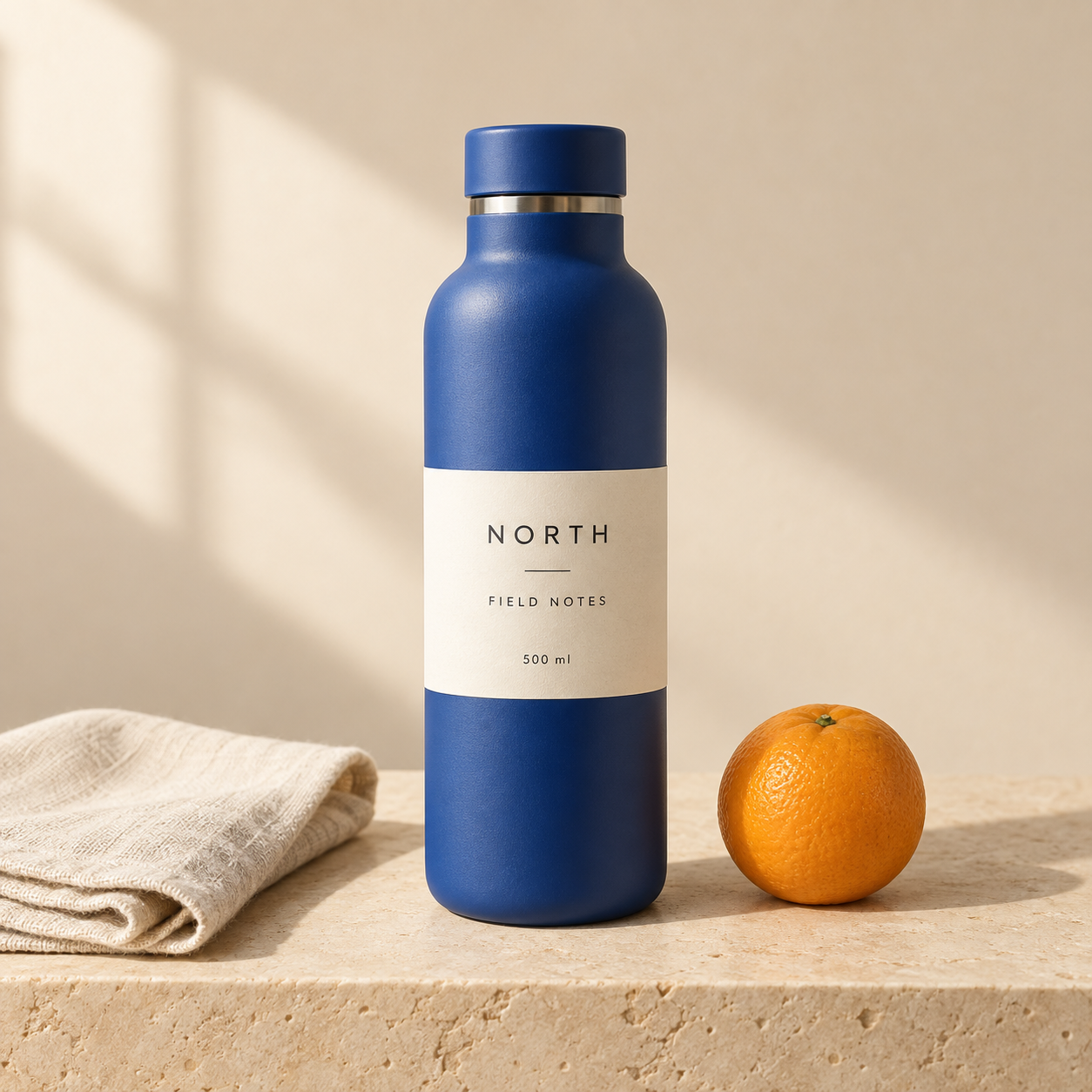
This GetLLMs example was generated and edited in Codex. The requested change was to turn the bottle cap from blue to terracotta orange while retaining the bottle, label, fruit, linen, framing, and lighting. The label remains readable and the composition stays similar, but small texture differences remain. Open both images at full size to judge the edit. The available generation receipt does not verify a Flare or Sunburst selection, so this illustrates an editing workflow rather than a matched comparison of the two API models.
Before: blue cap
After: orange cap
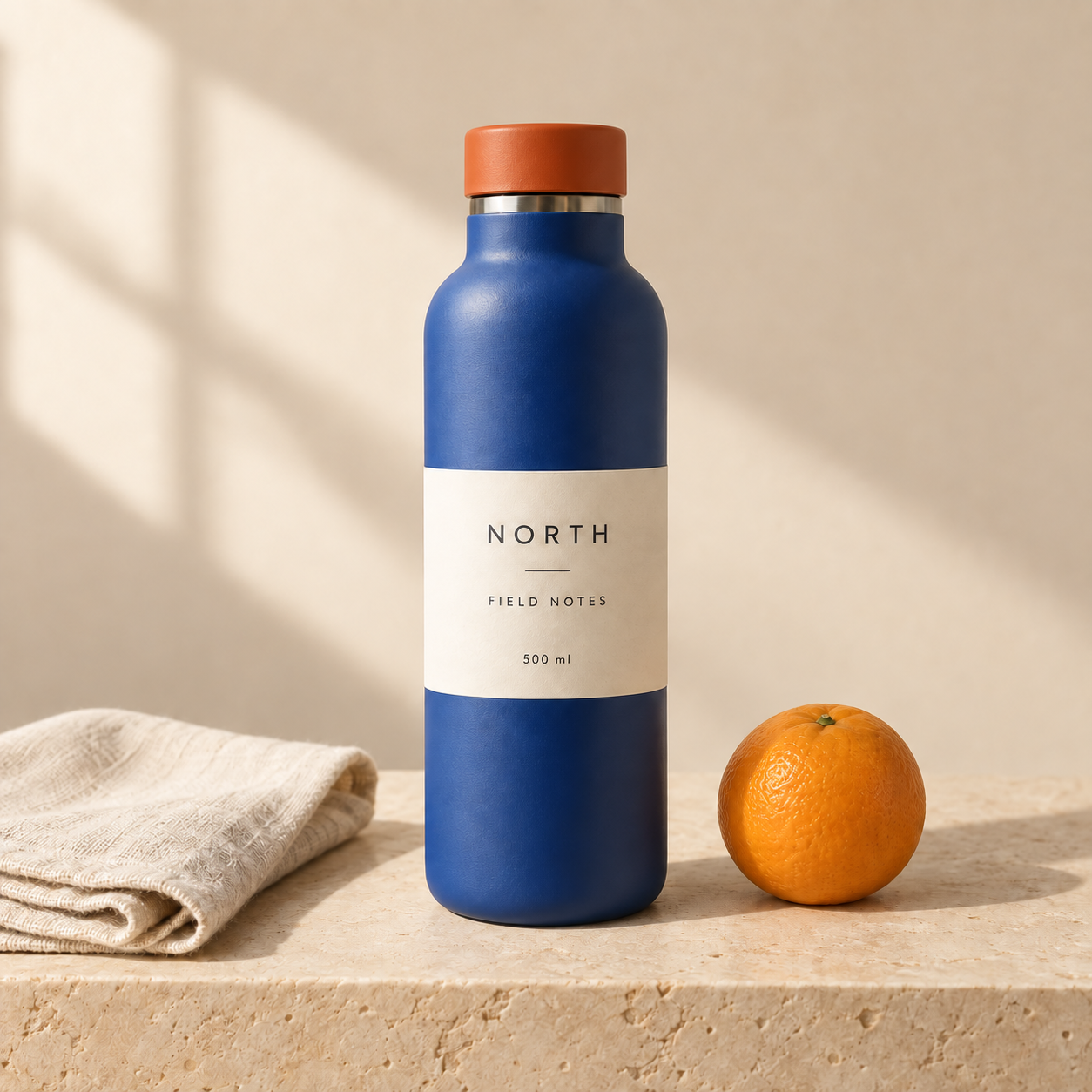
A single requested color edit, with the surrounding scene available for close inspection. Codex-generated workflow example; the API variant was not verified.
Silent before-and-after sequence: the blue-cap image appears first, followed by the orange-cap edit, with visible labels. · 8 seconds · No audio
Play to switch between the two views. This eight-second editorial sequence is assembled from still images, not generated motion.
GetLLMs · original image-editing demonstration · Open video file
- Before and after use the same 1254 × 1254 frame. Compare the cap, label lettering, bottle edges, fruit texture, and linen folds.
- The silent eight-second video shows the original for four seconds and the edit for four seconds. It is assembled from these two still images; it demonstrates neither native video generation nor generation speed.
- For a separately attributed Sunburst example, the Simon Willison source below includes his model command, reference chart, and raccoon edit. The OpenAI launch video is also linked below.
Source confidence
OpenAI
OpenAI
Simon Willison
OpenAI Help Center
OpenAI Developers
OpenAI Developers
OpenAI Developers
OpenAI Deployment Safety Hub
Reddit r/ChatGPT
Hacker News
ChatGPT Images 2.5 FAQ
Common questions about ChatGPT Images 2.5.
Is ChatGPT Images 2.5 available now?+
OpenAI says it is rolling out across all ChatGPT, ChatGPT Work, and Codex tiers on desktop, mobile, and web. Rollout timing can still differ by account, and some features vary by product surface.
Which API model should I use: Flare or Sunburst?+
Start with Flare for everyday and higher-volume work where speed matters. Test Sunburst when detailed generation or edit precision matters more than generation time. Compare both on the same assets and acceptance criteria instead of relying on the labels alone.
Does ChatGPT Images 2.5 generate 4K images?+
The launch and model pages reviewed here do not document a native 4K output guarantee. Community users are asking for it, but an upscale instruction is not proof that the returned file has true 4K dimensions. Check the current image guide and inspect the actual output file.
How much do GPT-Image-2.5 Flare and Sunburst cost?+
OpenAI lists the same 2.5 token rates for both: $5 text input, $1.25 cached text input, $8 image input, $2 cached image input, and $30 image output per million tokens. Its pages conflict on the comparison with GPT Image 2, so verify the current pricing and billing console before production use.
Is ChatGPT Images 2.5 the same as GPT Image 2?+
No. Images 2.5 is the newer ChatGPT release and API family. GPT Image 2 is the earlier API model. Flare and Sunburst have separate 2.5 model IDs and dated snapshots.
Can I use Images 2.5 through the API?+
Yes. Select `gpt-image-2.5-flare` or `gpt-image-2.5-sunburst` through the Images API, or choose one as the model behind the Responses API image-generation tool. Both generation and edit endpoints are documented.
Are Images 2.5 outputs watermarked?+
OpenAI says the release uses C2PA metadata and an invisible SynthID watermark across ChatGPT, Codex, and the API. Provenance signals can still be affected by copying or later transformations, so they are useful evidence rather than an infallible detector.