T3 Code
T3 Code is an open-source, MIT-licensed interface for coding agents such as Codex, Claude Code, and OpenCode. Its desktop, web, and mobile clients connect to a T3 Code environment on a workstation or server. The selected agent edits files and runs commands in that environment, and model requests go to the service configured for that agent.
Get T3 Code from the official site ↗Why it matters
If you use Codex to implement changes and Claude Code to review them, T3 Code gives you one place to run both. If you mainly use Codex and want to check work from your phone, the official app already supports that workflow.
Connect an existing coding agent
For Codex, T3 Code can connect a ChatGPT plan or use an existing Codex CLI login. Select the provider in T3 Code and check that it is available on the machine where the agent will run. Usage still counts toward the limits of the connected provider and account. The desktop app is available on Windows, macOS, and Linux.
- T3 Code’s Codex setup
Check the two sign-in paths and which features each supports.
Try Codex and Claude Code in one workflow
Both T3 Code and the Codex desktop app support worktrees and diff review. To test what T3 Code adds, start with a small edit in a separate worktree. Ask Codex to make the edit, then have Claude Code review the resulting diff if both agents are configured. Give the reviewer the task requirements and the relevant files. Inspect the diff yourself and run the repository’s tests before committing.
- See the maintainers’ multi-agent run
Theo Browne shows several agents in one T3 Code thread and its details panel.
- Codex worktrees
See how the official app runs parallel chats in separate checkouts.
Continue from your phone
T3 Code can connect to a running host over your local network, Tailscale, or T3 Connect. From your phone, you can follow a thread, send instructions, and respond to approvals while the agent works on the host. Official Codex also lets you continue existing chats, inspect changes, and approve commands from the ChatGPT mobile app paired with an online Mac or Windows host.
- Codex mobile pairing
Connect ChatGPT on your phone to your existing Codex workspace.
- Tailscale
Understand the private network option for reaching a host.
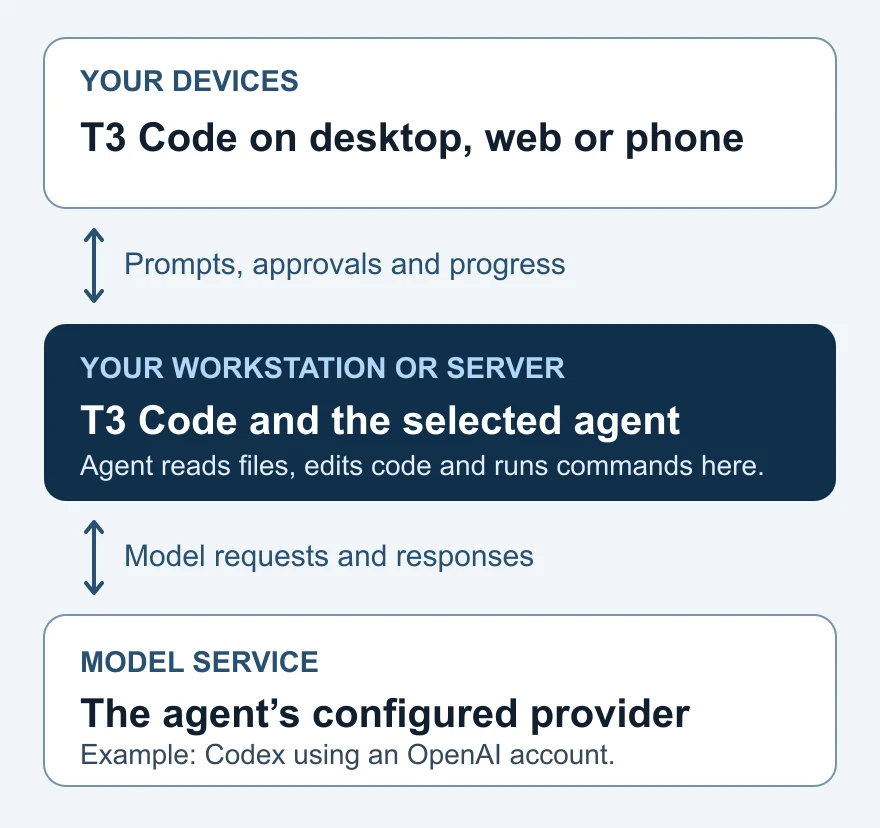
The workstation or server runs the coding agent. Your phone can steer the work and review the result. Diagram based on documented behavior.
Decide whether to switch
Keep the Codex desktop app as your main workspace if you mostly use Codex and rely on its scheduled tasks or ChatGPT plugins. If you regularly switch between agents, try T3 Code with a new worktree first. Then check whether the conversations, tools, and approvals your work depends on carry over. Save any important tool output and attachments before trying the chat importer.
- Codex features on Windows
Check the official app’s scheduled tasks, plugins, and Git features.
- T3 Code’s import guide
See which projects and conversations the importer can read.
Useful first jobs
- Run multiple coding agents from one interface.
- Review a change with a different agent.
- Continue work on a connected workstation or server from your phone.
Frequently asked questions
Can I use my existing Codex subscription with T3 Code?
Yes. T3 Code can connect an eligible ChatGPT plan or use an existing Codex CLI login. The provider’s usage limits and account features still apply.
Can T3 Code import my Codex chats?
T3 Code can import recent Codex chats from selected local projects on a best-effort basis. Its documented importer looks at conversations active in the last 30 days, keeps up to 200 visible messages per conversation, and skips tool activity and attachments.
Do I need T3 Code to approve Codex work from my phone?
No. You can approve Codex commands and review changes in the ChatGPT mobile app after pairing it with a supported Mac or Windows host.
Sources and evidence
Checked November 23, 2026 against T3 Code’s repository, provider and connection guides, and OpenAI’s Codex documentation. The example below is a suggested trial. The linked screenshot shows a run by the T3 Code maintainers.
- Project overview and MIT license ↗
T3 Code · Primary source
- Connect an existing Codex account ↗
T3 Code · Primary source
- Connect to a T3 Code host ↗
T3 Code · Primary source
- Project and conversation import ↗
T3 Code · Primary source
- Use Codex over a remote connection ↗
OpenAI · Primary source