ChatGPT Images 2.6
ChatGPT Images 2.6 is OpenAI’s November 4, 2026 image-generation and editing release for ChatGPT, Codex and the API. Developers can choose gpt-image-2.6-flare for fast iteration or gpt-image-2.6-sunburst for detailed visual work. GIF and SVG output, annotation-guided edits and a separate complexity control have specific API contracts; a product announcement does not identify the model behind an individual Codex result.
Read the official Images 2.6 announcement ↗At a glance
Where OpenAI recommends starting. These are provider positions, not a matched GetLLMs quality test.
| Decision | GPT-Image-2.6 Flare | GPT-Image-2.6 Sunburst |
|---|---|---|
| First workflow to test | Interactive creation and quick iterations | Detailed compositions and precise edits |
| Shared Image API features | Generation, editing, complexity, markup, SVG and GIF | Generation, editing, complexity, markup, SVG and GIF |
| Published image token rates | $8/M input; $2/M cached input; $30/M output | $8/M input; $2/M cached input; $30/M output |
| Compare before migration | Accepted-image cost, response time and edit fidelity | Accepted-image cost, response time and edit fidelity |
First workflow to test
- GPT-Image-2.6 Flare
- Interactive creation and quick iterations
- GPT-Image-2.6 Sunburst
- Detailed compositions and precise edits
Shared Image API features
- GPT-Image-2.6 Flare
- Generation, editing, complexity, markup, SVG and GIF
- GPT-Image-2.6 Sunburst
- Generation, editing, complexity, markup, SVG and GIF
Published image token rates
- GPT-Image-2.6 Flare
- $8/M input; $2/M cached input; $30/M output
- GPT-Image-2.6 Sunburst
- $8/M input; $2/M cached input; $30/M output
Compare before migration
- GPT-Image-2.6 Flare
- Accepted-image cost, response time and edit fidelity
- GPT-Image-2.6 Sunburst
- Accepted-image cost, response time and edit fidelity
Why it matters
The useful change is a broader creative workflow: make an image, refine a particular area, export editable vector artwork or create a short animation. Choosing the right model, endpoint and output format matters as much as the release name, especially when preserving a product’s identity or budgeting repeated edits.
The release name and the API models are different identities
Images 2.6 names the product release. The callable image-model IDs are gpt-image-2.6-flare and gpt-image-2.6-sunburst. OpenAI announces availability in ChatGPT and Codex across subscription tiers and separately documents both API models. An app plan, an API account and the feature controls exposed by a particular client are separate access surfaces.
- GPT-Image-2.6 Flare
Fast iteration: exact API ID, formats, controls, token rates and documented requests.
- GPT-Image-2.6 Sunburst
Detailed generation and precise edits: exact API ID, formats, controls, token rates and documented requests.
- Both API model cards list text and image inputs with image output, and support /v1/images/generations and /v1/images/edits.
- The 2.6 model cards do not list direct Responses, Chat Completions, audio or video endpoint support. Do not copy a 2.5 Responses-tool example into a 2.6 integration without checking its separate current contract.
- The current cards list the undated model aliases. No dated 2.6 snapshot is assumed here.
Choose a model by the work you need to finish
OpenAI positions Flare for quick iterations and Sunburst for demanding detail or editing accuracy. Its launch reports image generation 50% faster than before and says low-quality Flare requests can finish in as little as six seconds. These are publisher claims, not a response-time guarantee or an independent ranking. Test the same prompts, references, dimensions and quality before replacing a working workflow.
- Official 2.6 prompting and migration guide
Compare model selection and controlled migration steps.
- Inspect exact lettering, product geometry, repeated character details and the final result after several edits.
- Measure retries and cost per usable result as well as request time. A faster rejected image does not finish the task.
- Preserve a baseline from 2.5 or GPT Image 2 and change one control at a time.
GIF output creates a short animation, with its own limits
The Image API documents animated output through /v1/images/generations with output_format set to gif. Describe a subject, a specific movement and the intended loop. The edit endpoint does not return GIF output. This is a short image-animation workflow; it does not establish general video-model or audio-generation support.
- Official GIF example and request fields
Inspect the Sunburst lantern animation and the documented output contract.
- frame_count accepts 2–64 frames; the default is 9.
- frame_duration_ms accepts 20–2000 milliseconds per frame, rounded to 10 milliseconds; the default is 200.
- Frame dimensions must fit the model and total-request pixel limits. Nine frames at 200 milliseconds represent a 1.8-second cycle, not a promise of smooth motion.
- GIF output excludes streaming, partial images, custom output compression and prompt_rewriter. Verify actual file bytes and multiple decoded frames, then inspect the loop for artifacts.
SVG output provides editable vector artwork
Set output_format to svg on /v1/images/generations and use n=1. OpenAI’s documented process first creates a reference image, then uses it to author static SVG geometry. The quality setting applies to that reference. This is different from merely saving a raster image with an .svg extension, and it should not be described as proof of direct vector-token generation.
- Official Flare and Sunburst SVG examples
Compare the two bakery-logo outputs and the format restrictions.
- The returned SVG contains static vector content without scripts, external resources or embedded raster images.
- SVG output excludes streaming, partial images, output_compression and prompt_rewriter. The edit endpoint does not output SVG, and SVG is not a supported raster edit input.
- Budget for both the image-model reference and the authoring model’s tokens; the image-output token rate alone does not give the complete SVG bill.
Markup shows where to edit; the prompt explains the change
For an annotation-guided edit, send the original image and a transparent PNG overlay through /v1/images/edits. The overlay must match the first input image’s pixel dimensions. Use markup to point at the region and the prompt to state what should change and what must remain. This differs from a prompt-only edit or a Responses API mask.
- Official markup-guided edit example
Check the image, overlay alignment and multipart edit request.
- OpenAI’s kitchen example circles a vase, asks for a recolor and removes the annotation from the finished result.
- The guide documents markup for supported 2.5 and 2.6 models, so its presence alone does not identify a 2.6 backend.
- Inspect surrounding objects, lettering and edges after the edit. If untouched pixels must remain identical, the prompting guide recommends compositing the approved region into the original.
Complexity and quality control different parts of the request
Complexity controls planning before rendering; quality controls visual detail. Both 2.6 variants accept low, medium or high complexity and default to high when the field is omitted. OpenAI suggests trying low complexity for focused edits, then raising it when a scene has more relationships or constraints. More planning can add latency or unwanted changes, so higher is not automatically better.
- Quality accepts auto, low, medium, high, xhigh and max.
- To compare complexity, hold quality and the other request conditions fixed. To inspect small text or texture, compare quality while holding complexity fixed.
- There is no separate complexity fee, but total token use and accepted-result cost still depend on the workload.
Equal token rates do not mean equal cost per image
The current 2.6 Flare and Sunburst cards and pricing table list $5 text input, $1.25 cached text input, $8 image input, $2 cached image input and $30 image output per million tokens. Per-image cost depends on dimensions, quality, token consumption, references and retries. SVG adds authoring-model work. Check the actual request’s usage and applicable billing conditions rather than multiplying a speed claim into a cost claim.
- Current OpenAI image pricing
Recheck the live rates and request-specific cost estimate.
- The image guide’s cached-input explanation explicitly discusses 2 and 2.5. Listed 2.6 cached rates do not prove a particular direct Images request receives a cache discount.
- API usage and account rate limits are separate from a ChatGPT or Codex subscription. The launch does not establish unlimited image generation.
- Community discussion raises practical questions about low/medium token consumption and animation artifacts. Those reports guide what to test; they do not establish a universal regression.
Inspect an original Codex editing workflow with an unknown model
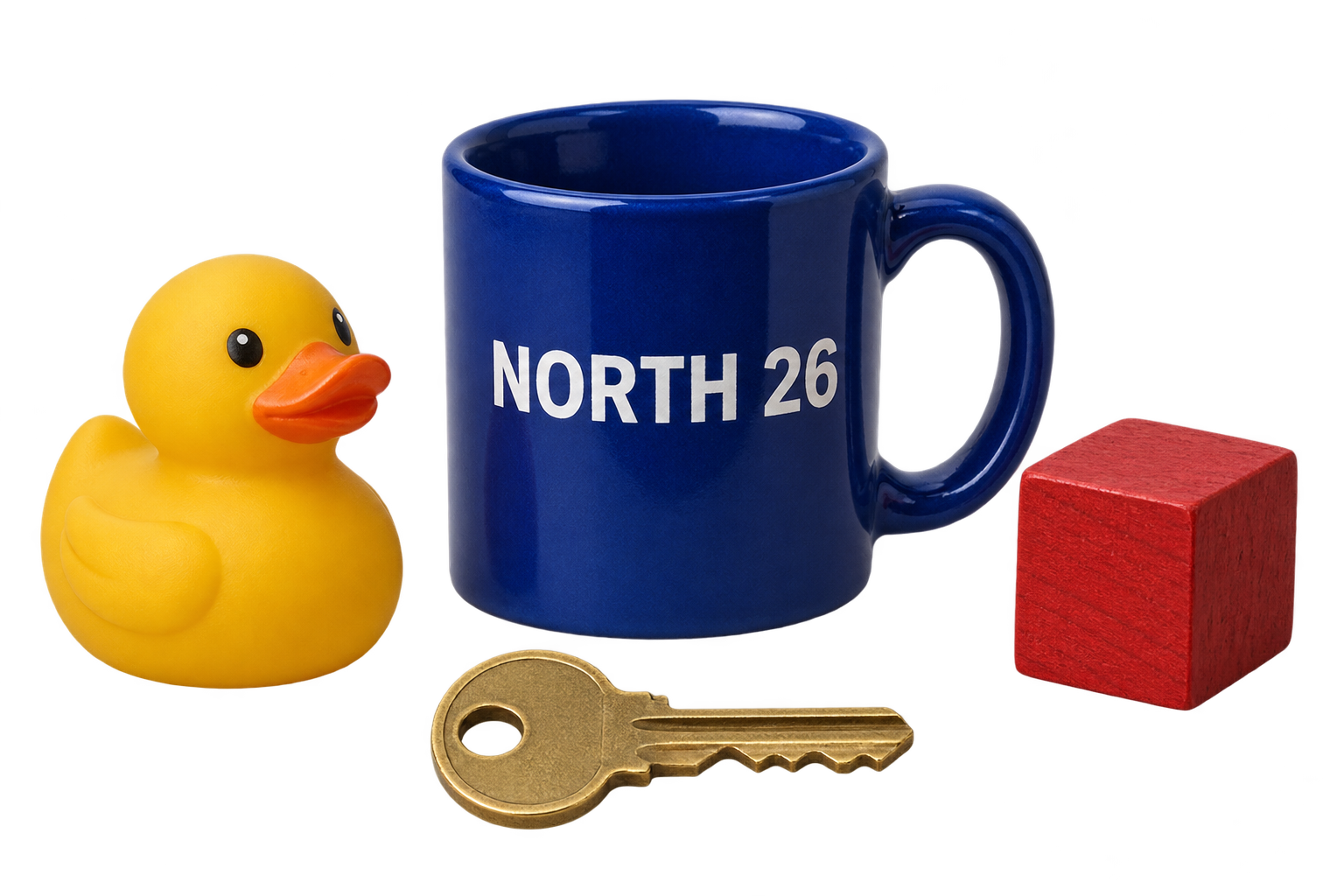
GetLLMs generated the product scene below and asked the same Codex entry to change only the red wooden cube to green. The mug’s NORTH 26 lettering and overall arrangement remain recognizable, but the cube and mug textures also change. The PNGs contain real transparency and unwanted colored translucent halos. The tool returned no backend model identity, so these are Codex workflow examples, not confirmed Images 2.6, Flare or Sunburst results.
Before: red cube
After: green cube
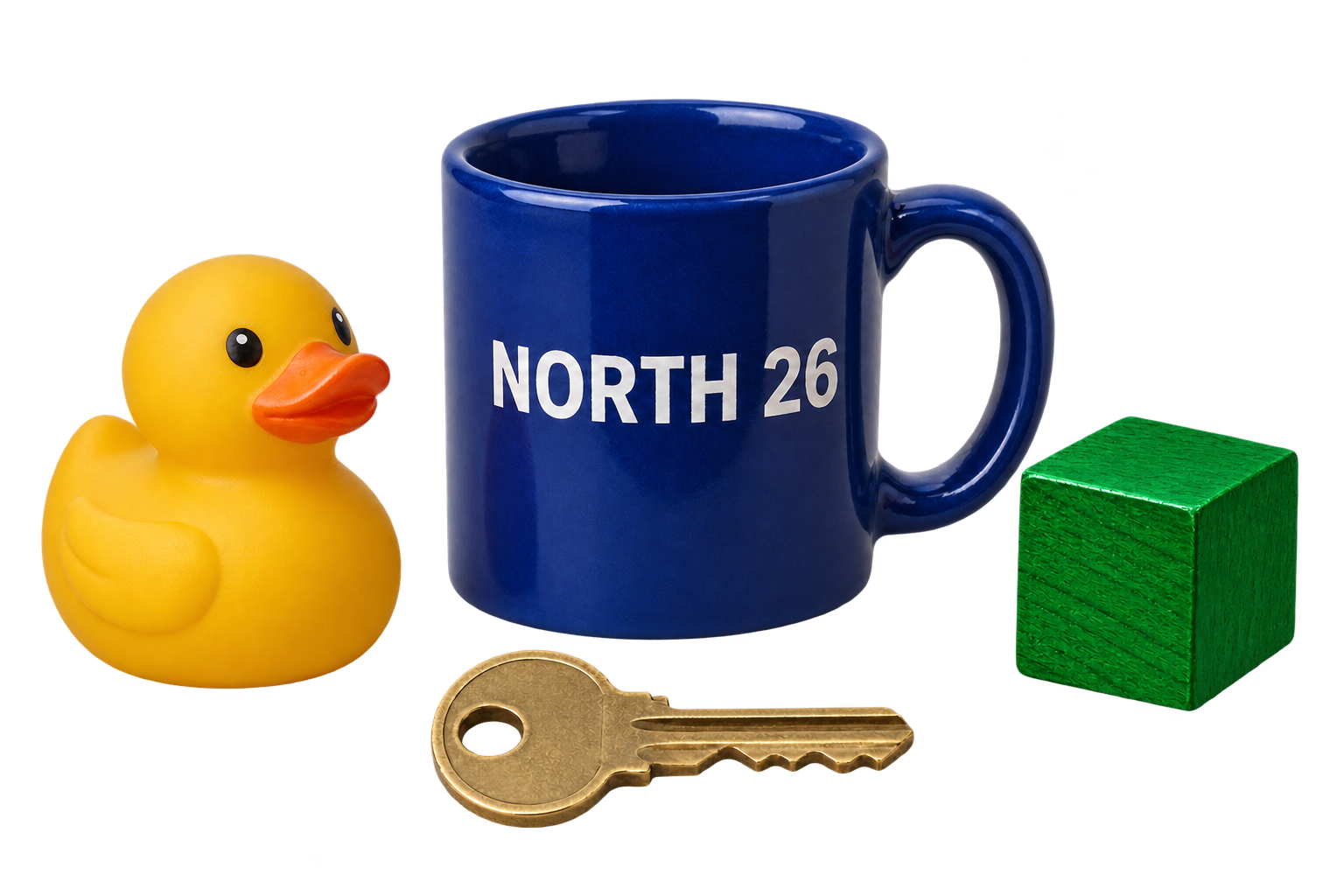
Original Codex generation and targeted edit; backend model unverified. This is not a confirmed Images 2.6 test. The color change succeeds, with texture drift and imperfect cutout edges.
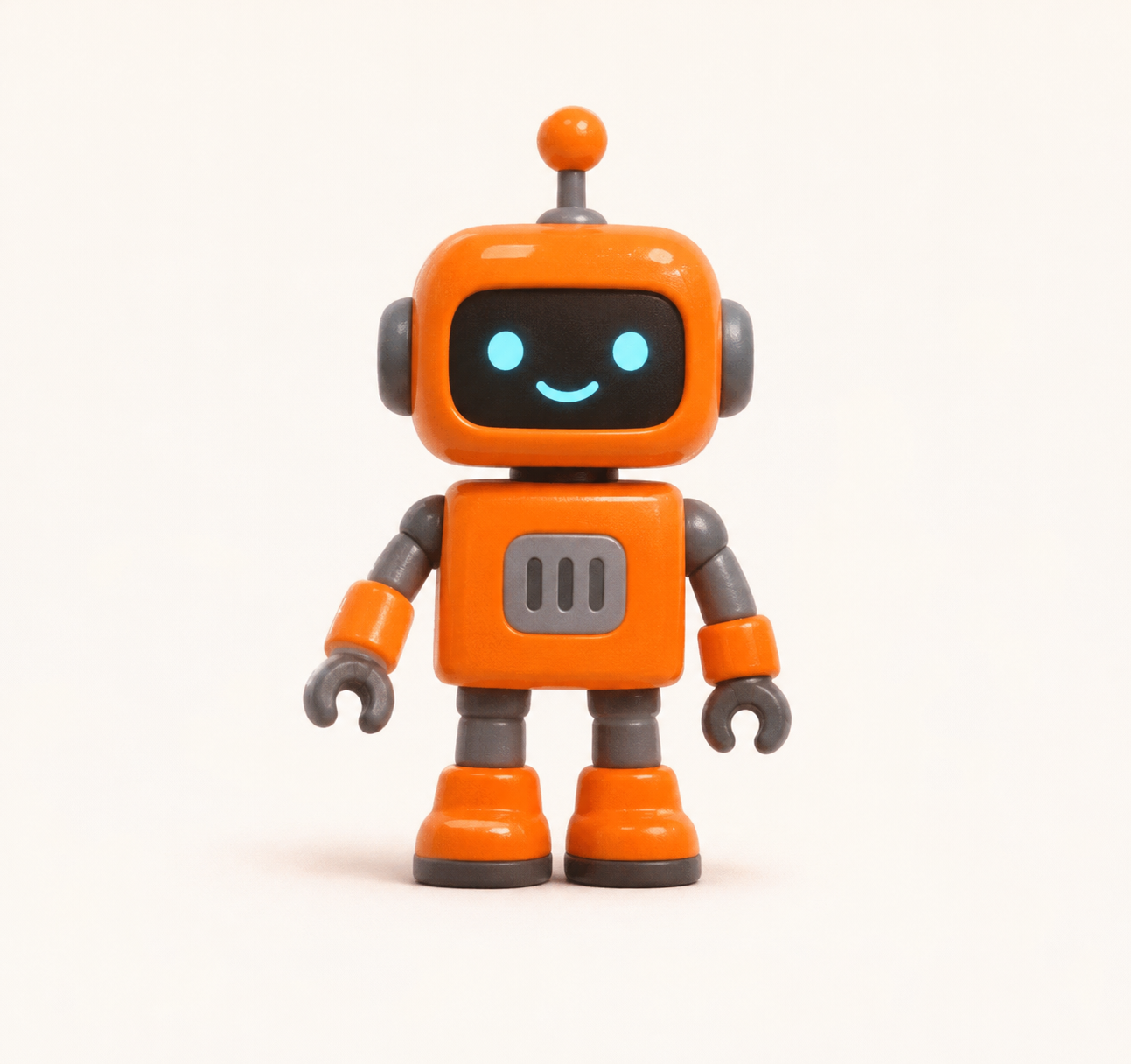
The GIF request returned this still PNG, not an animation. This records one unsuccessful request in the tested Codex entry; its backend model was not identified.
- Both images are 1536 × 1024. Open them at full size to inspect the mug, duck, key, cube and edges.
- A separate request for a nine-frame waving-robot GIF returned a 1293 × 1216 single-frame PNG. That request failed animation acceptance in this Codex entry; it does not disprove the documented 2.6 API feature.
- The tested entry did not expose explicit model, output-format, complexity or markup controls. No API comparison or verified 50% speed improvement was established.
Verify the result you intend to ship
Choose the output by its next use: inspect real alpha for cutouts, vector paths for editable graphics, and decoded frames plus visible motion for GIFs. Check lettering, geometry and identity throughout repeated edits. Read OpenAI’s Images 2.6 system card and its stated evaluation scope before drawing safety conclusions. Neither a successful generation nor a safety-test score guarantees that an output is accurate or suitable for publication.
- Images 2.6 safety evaluations and limitations
Read the scope of the publisher’s image and GIF evaluations.
Useful first jobs
- Iterate on product imagery and campaign visuals
- Refine a specific object while checking identity drift
- Create short character or product GIF loops
- Export editable SVG illustrations and logos through the API
- Compare model, quality and complexity choices on a saved workflow baseline
Frequently asked questions
Can Images 2.6 create animated GIFs?
Yes. OpenAI documents GIF output on the Image API generation endpoint, with frame-count and frame-duration controls. The edit endpoint does not output GIFs. The local Codex request shown here returned a still PNG and did not identify its model, so it is not a confirmed test of the 2.6 API.
Does Images 2.6 produce editable SVG files?
Yes, the Image API documents static SVG output from the generation endpoint with n=1. It creates a reference image and then authors the vector document. Scripts, external resources, embedded raster images and SVG edit output are excluded; billing includes both reference-image and authoring work.
Should I choose Flare or Sunburst?
Start by testing Flare when quick iteration matters most, or Sunburst for demanding detail and precise edits. OpenAI positions them for those jobs, but you should compare identical prompts, references and settings for accepted-result cost, latency and fidelity.
Are complexity and quality the same setting?
No. Complexity controls planning and quality controls visual rendering detail. Both 2.6 models accept low, medium and high complexity, defaulting to high. Keep one setting fixed while testing the other.
Does the same token price mean the same price per image?
No. Flare and Sunburst share published token rates, but dimensions, quality, input references, token consumption and retries affect the bill. SVG also adds authoring-model tokens. Measure the cost of outputs that actually meet your requirements.
Will a targeted edit leave every other pixel unchanged?
Do not assume pixel-identical preservation. The Codex example here retains the scene and lettering but changes textures outside the recolored cube. OpenAI’s prompting guide recommends compositing an approved edit into the original when untouched pixels must remain identical.
Sources and evidence
OpenAI’s dated announcement and current model cards, image guides, pricing and system card establish the release and API contracts. Hacker News supplies reader questions about animation artifacts, edit drift and cost. The original Codex examples below have an unknown backend model and are not confirmed Images 2.6 tests.
- Introducing Images 2.6 — November 4, 2026 ↗
OpenAI · Primary source
- GPT-Image-2.6 Flare model card ↗
OpenAI Developers · Primary source
- GPT-Image-2.6 Sunburst model card ↗
OpenAI Developers · Primary source
- Image API: complexity, markup, SVG and GIF ↗
OpenAI Developers · Primary source
- GPT Image 2.6 prompting and migration guide ↗
OpenAI Developers · Primary source
- Current image-generation token prices ↗
OpenAI Developers · Primary source
- ChatGPT Images 2.6 system card ↗
OpenAI Deployment Safety Hub · Primary source
- Images 2.6 launch discussion: cost, artifacts and model visibility ↗
Hacker News · Community experience